
I took a freshly launched WhatsApp marketing platform that was losing more than half its messages and made it a product businesses could run their marketing on. I fixed the foundation first, then built what was missing, with no analytics to lean on.
- My role
- Head of Product: research, prioritisation, specs and UX
- Worked with
- Founder and engineering team
- Users
- Small businesses and their support teams
- Shipped
- 17 UX fixes and 4 new features. The feature spec went live in 4 days
49→77%
message delivery rate
64%
of businesses go live on WhatsApp the day they sign up
0
WhatsApp numbers banned by Meta
35×
daily message volume, with quality holding
01Executive summary & problem
Fewer than half the messages were arriving
- Context: aidm.me lets businesses send WhatsApp campaigns, reply to customers and manage contacts through Meta’s official API. It sits inside AppX’s ecosystem, which already serves thousands of educators and creators.
- The hook: Only 49% of messages were being delivered. Businesses signed up, got stuck connecting WhatsApp, and left. Contacts with unconfirmed opt-in were going into campaigns unwarned, which is how WhatsApp numbers get banned.
- Core problem: The product had been built around WhatsApp’s API, not around a small business owner. It assumed users already understood Meta’s rules, templates and pricing, and it gave them no way to see whether any of it was working.
02Strategic framework
How I worked through it
There were no analytics, and I wasn’t allowed to add tracking. So every step of my process had to rely on using the product, not on dashboards.
Phase: Comprehend
Focus: Goals & limitsWhat I did: Make businesses successful on WhatsApp without breaking Meta’s rules. No analytics, a small team, speed over polish.
Phase: Identify
Focus: Three usersWhat I did: Owner, support agent, and the manager or client they report to.
Phase: Prioritise
Focus: TriageWhat I did: I went through all 7 core flows as a new business owner and tagged every issue.
Phase: Solve
Focus: Two layersWhat I did: Fix the foundation first, then build the missing features.
Phase: Measure
Focus: Delivery firstWhat I did: North Star plus guardrails, all read from the production database.
Who it’s for
The business owner
Runs offers, reminders and order updates on WhatsApp. Isn’t a marketer or a copywriter, and doesn’t know Meta’s rules.
- Gets stuck at WhatsApp setup
- Faces a blank template box
- Can’t tell if campaigns are working
The support agent
Handles the replies that flood in after every campaign.
- Shares one login with the whole team
- Retypes the same answers all day
- Sees every customer’s phone number
The manager or client
Doesn’t use the product, but decides whether to keep paying for it.
- Needs proof that WhatsApp is paying off
- Wants a report, not a screenshot
What I prioritised
I triaged with MoSCoW, not RICE. Without analytics there was no honest Reach number to score, so I ranked by user pain and business risk instead.
Must4
- Setup-first onboarding
- Opt-in clarity
- Gate at Launch
- Analytics & reports
Should4
- AI template drafts
- Team logins & roles
- Canned replies
- Plain-language templates
Could3
- Festival templates
- Auto-resolve old chats
- Auto-pause on Meta reclassify
Won’t, for now2
- Ads manager
- In-chat payments
Keep as is3
- Template builder & preview
- Approval tracking
- Campaign error messages
03Solution deep dive
Fix the foundation, then build what’s missing
Every change maps to a pain point above. Screens are from the live product.
Layer 2 · build what was missing
spec live in 4 daysEAnalytics & reports
FAI template drafts
GCanned replies
HTeam logins & roles
Layer 1 · fix the foundation
firstASetup first
BGate at Launch
CTemplate words
DOpt-in made visible
Layer 1: Fix the foundation
A
Send new users to Setup until WhatsApp is live
- Pain point:
- New accounts opened on an empty Live Chat screen with nothing to click, and Setup read “Pending” before the user had done anything.
- Instead of:
- Adding a hint to the empty screen, which would explain the dead end without removing it.
- Solution:
- Setup is now the first screen until WhatsApp is verified, with honest status and visible progress. While Meta reviews, users are prompted to import contacts, so the wait isn’t wasted.
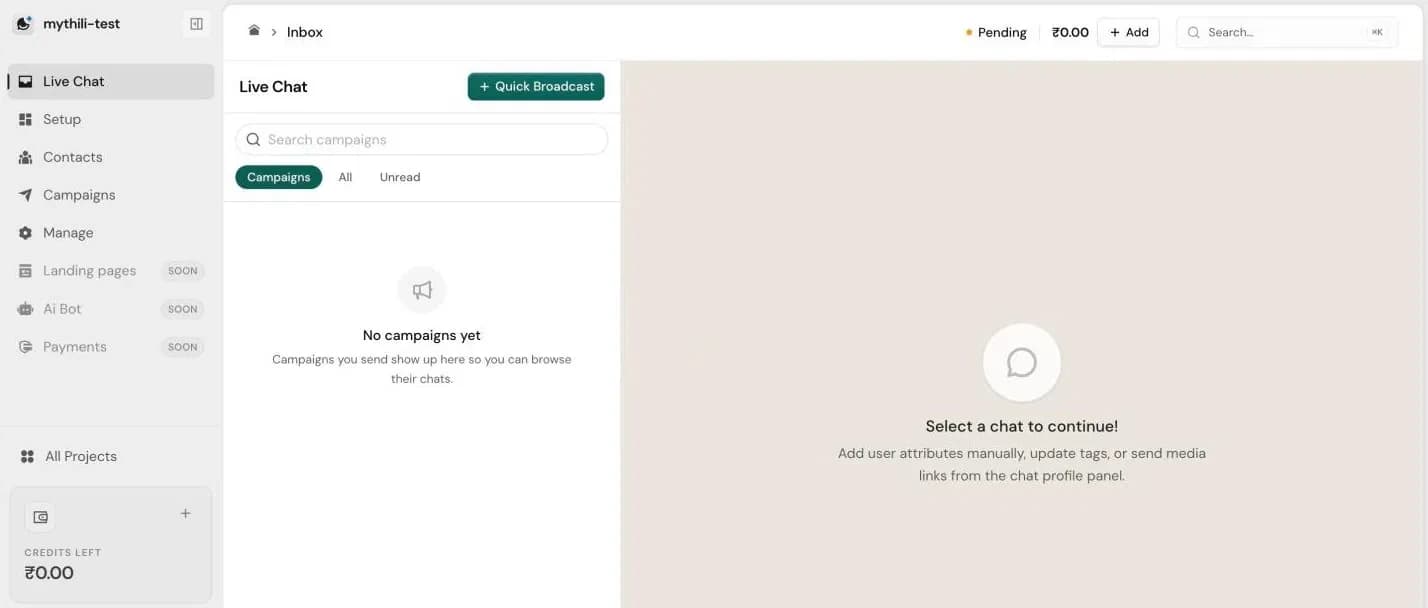
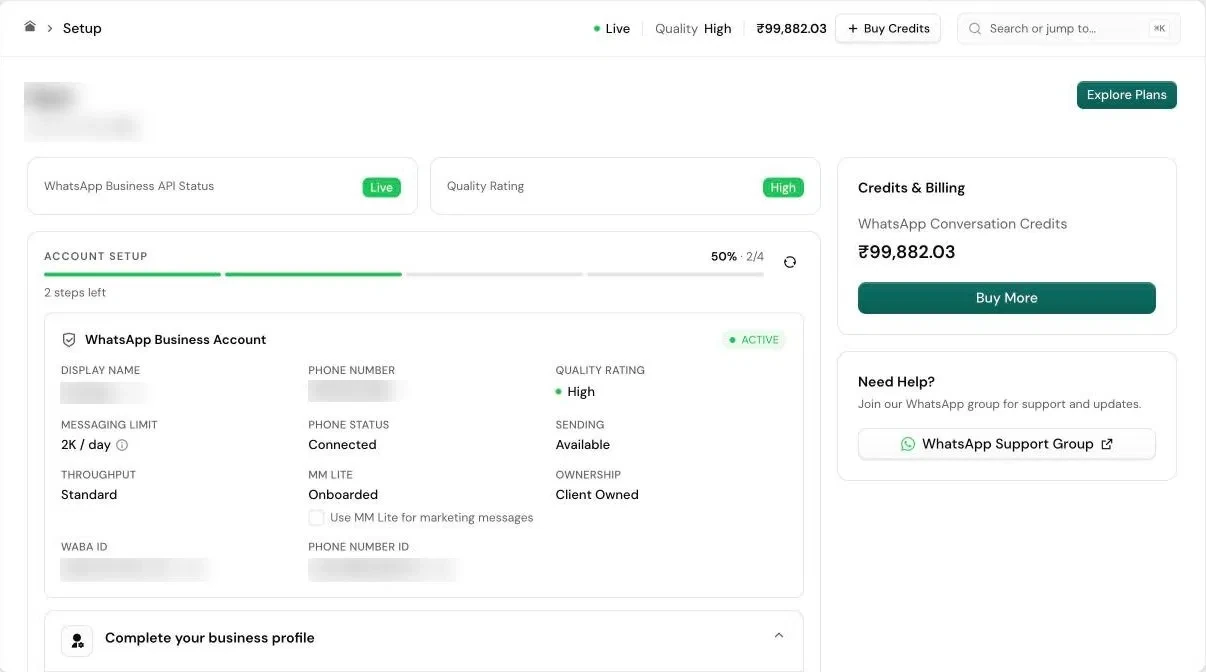
Before
Sign up
Empty Live Chat
nothing to click
After
Sign up
Setup first
honest status, progress
Import contacts
while Meta reviews
Live on WhatsApp
0%
of businesses go live on WhatsApp the day they sign up
B
Stop Free-plan users at Launch, not at step 6
- Pain point:
- Free-plan users could build an entire 6-step campaign, about 10 minutes of work, before finding out they couldn’t send it.
- Instead of:
- A louder warning inside the flow. People would still lose the work they’d already done.
- Solution:
- The upgrade or connect prompt now appears the moment someone clicks Launch. I also gave the feature one name everywhere, because it had been called four different things.
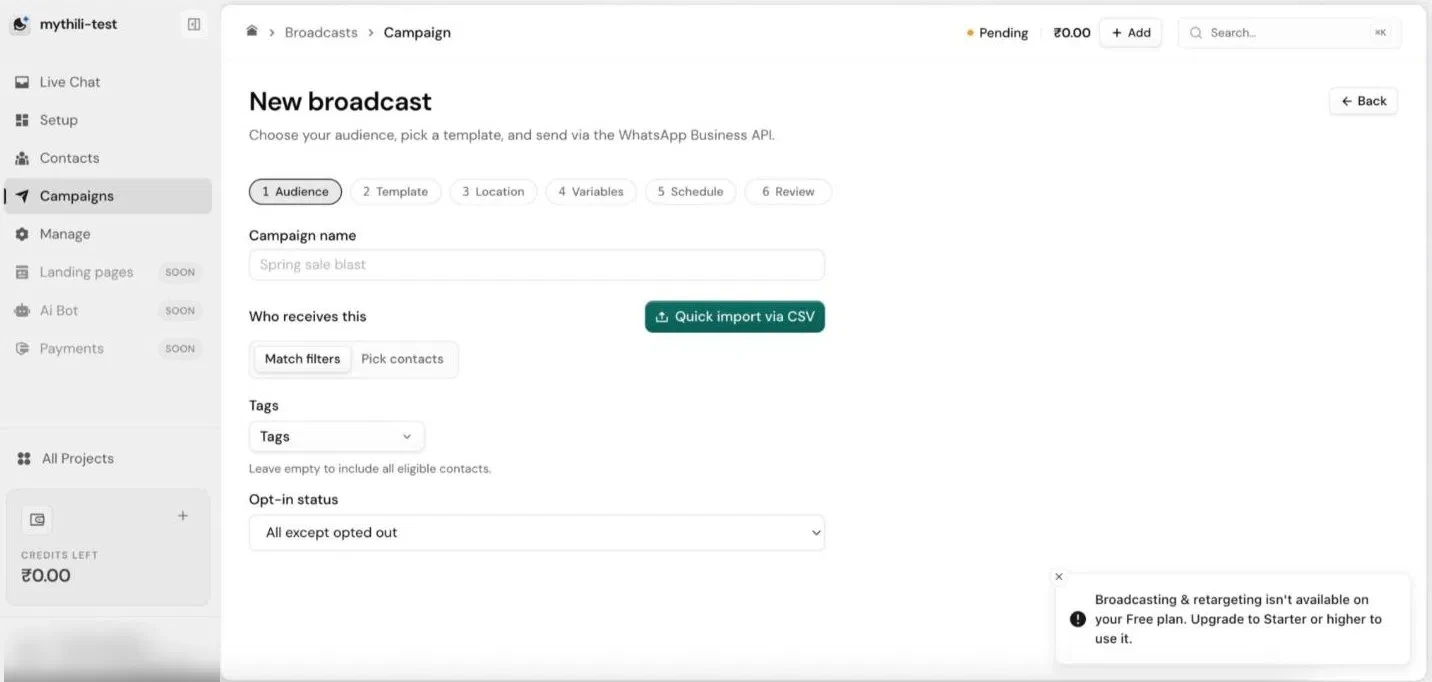
Before
about 10 minutes lostAfter
stopped at LaunchC
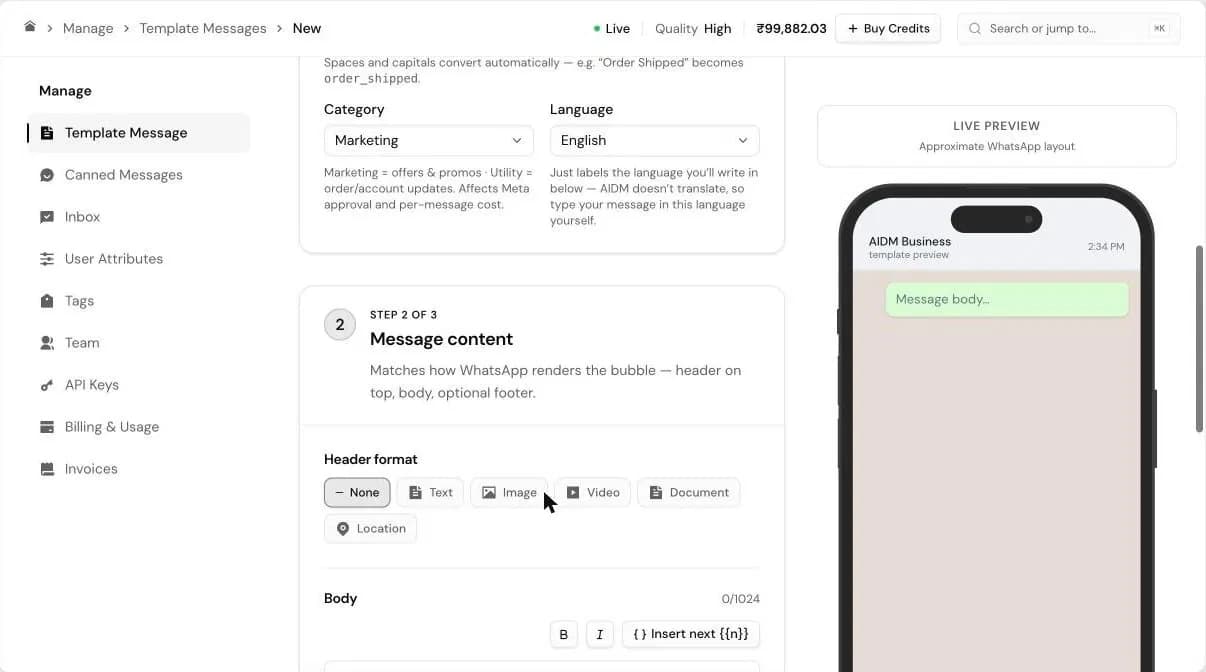
Keep the template builder, fix its words
- Pain point:
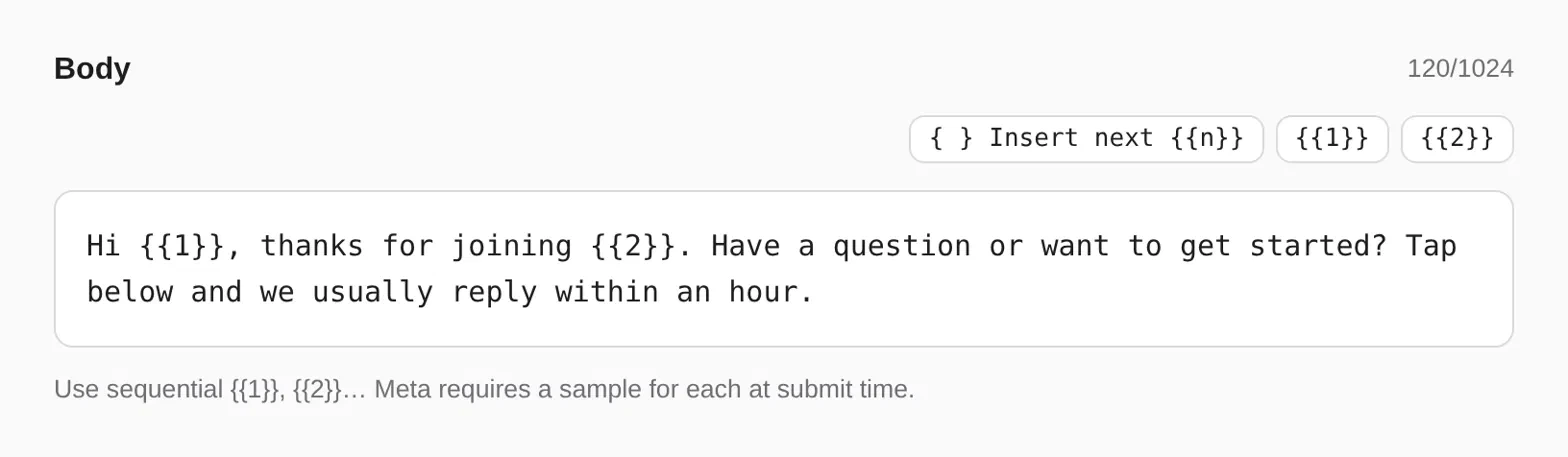
- Names had to be typed in snake_case. Category, which decides Meta approval and price, had no explanation, and Language looked broken because nothing on screen changed.
- Instead of:
- A rebuild. The live preview, presets and 3-step flow were already strong.
- Solution:
- Names format themselves as you type, and Category and Language each get one plain line saying what they do and cost.
D
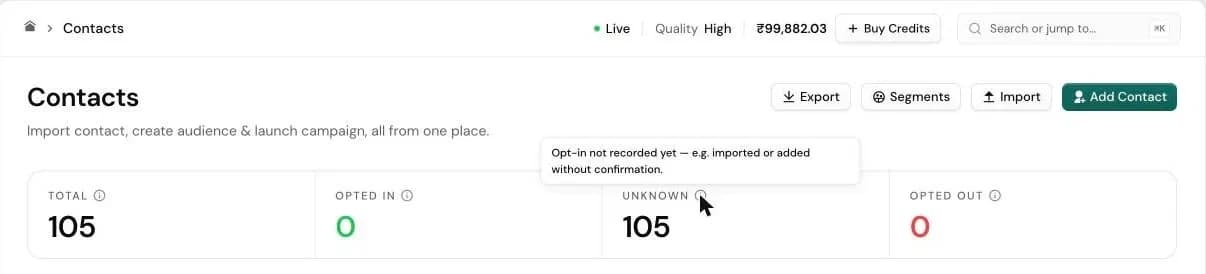
Make WhatsApp’s rules visible
- Pain point:
- Opted In, Opted Out and Unknown appeared on every contact with no explanation, even though WhatsApp only allows template messages to opted-in contacts.
- Solution:
- Each status explains itself right where users see it, so the ban risk is visible before anyone hits Send.
Contacts
every status explained
0
WhatsApp numbers banned by Meta
Layer 2: Build what was missing
Once the basics worked, I went back through the product and wrote a spec for the features businesses needed to run WhatsApp day to day. Engineering shipped it in 4 days.
E
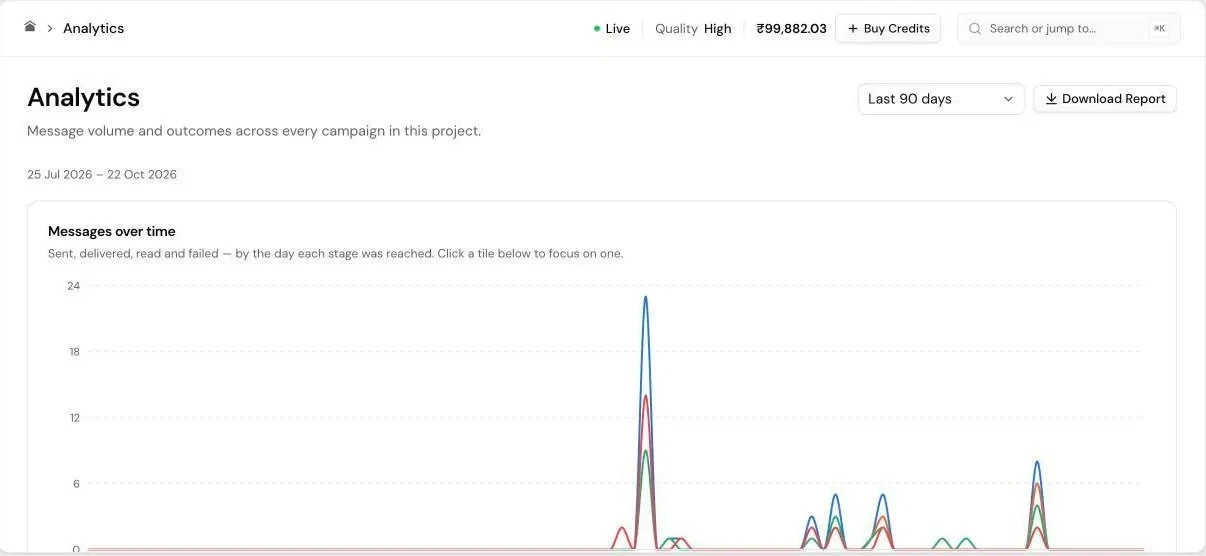
Analytics and downloadable reports
- Pain point:
- Every number was trapped inside one campaign. “Is this working?” meant adding up campaigns by hand, and there was nothing to send to a manager or client.
- Solution:
- An account-level Analytics page with date ranges, messages over time and one-click reports. This was the biggest gap in my review, so it led the spec.
F
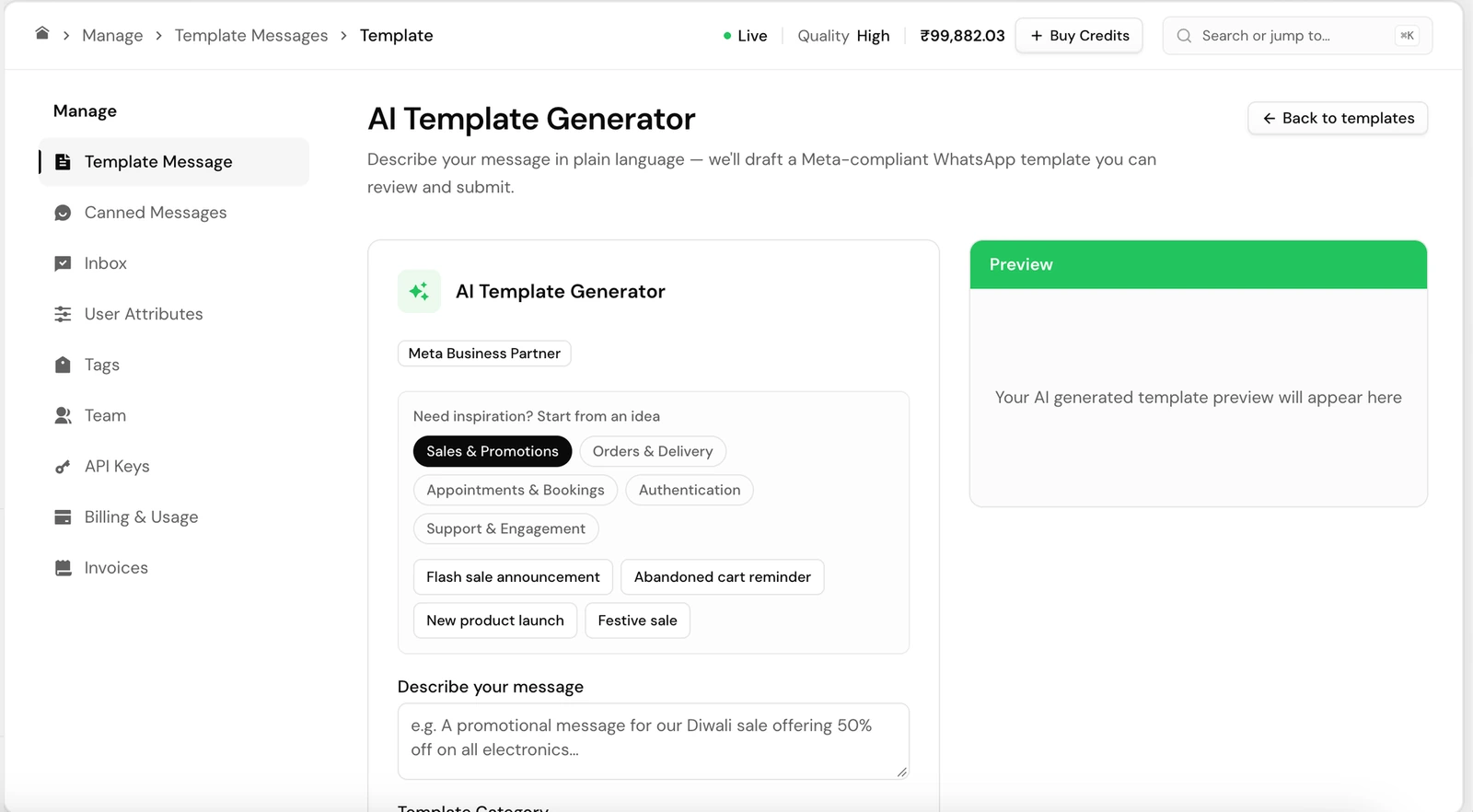
AI template drafts
- Pain point:
- Most owners aren’t copywriters, and a blank template box is where campaigns stall.
- Solution:
- “Generate with AI” writes a first draft in WhatsApp’s format, so users start from something that works and has a better chance of Meta approval.
G
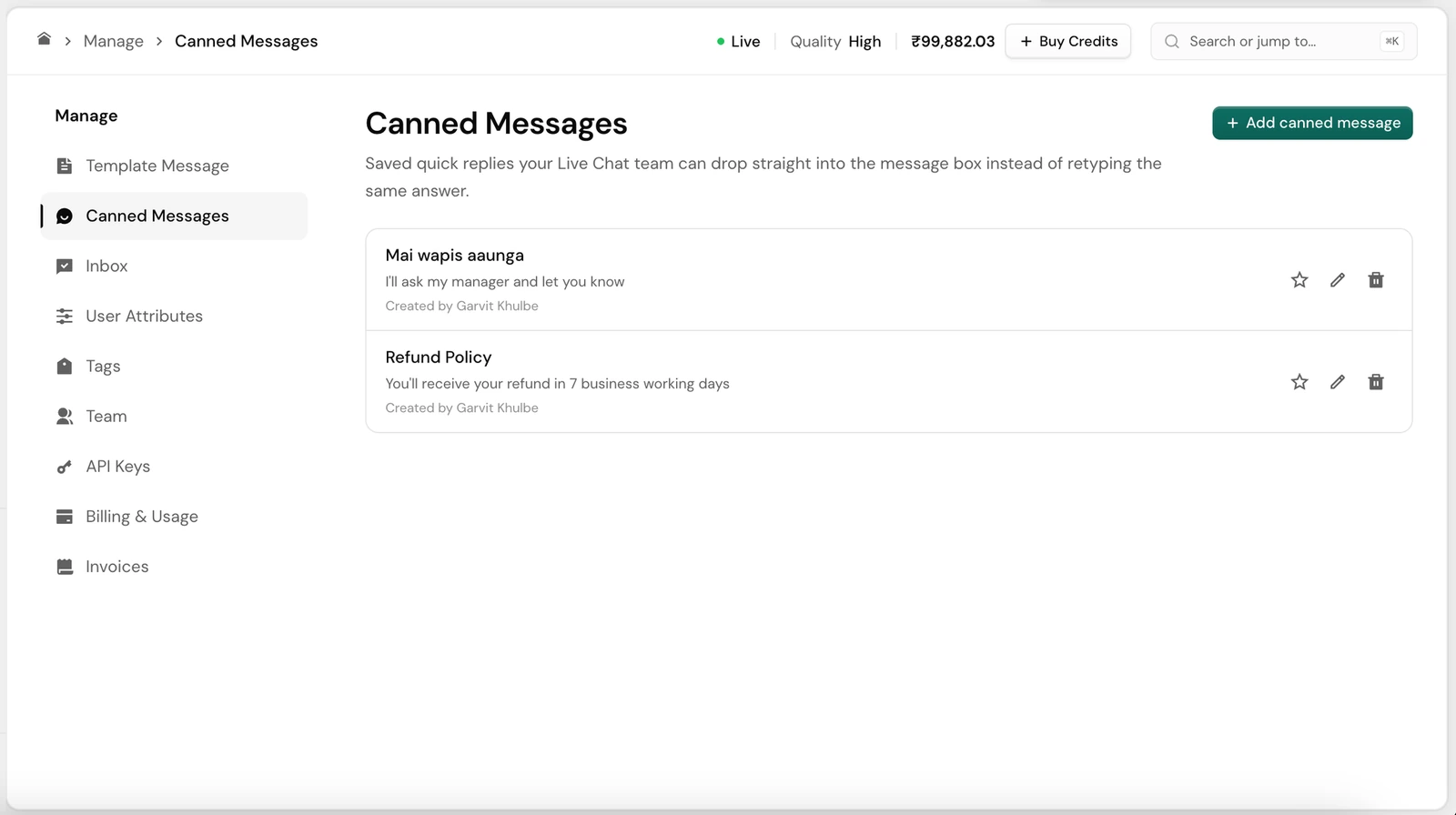
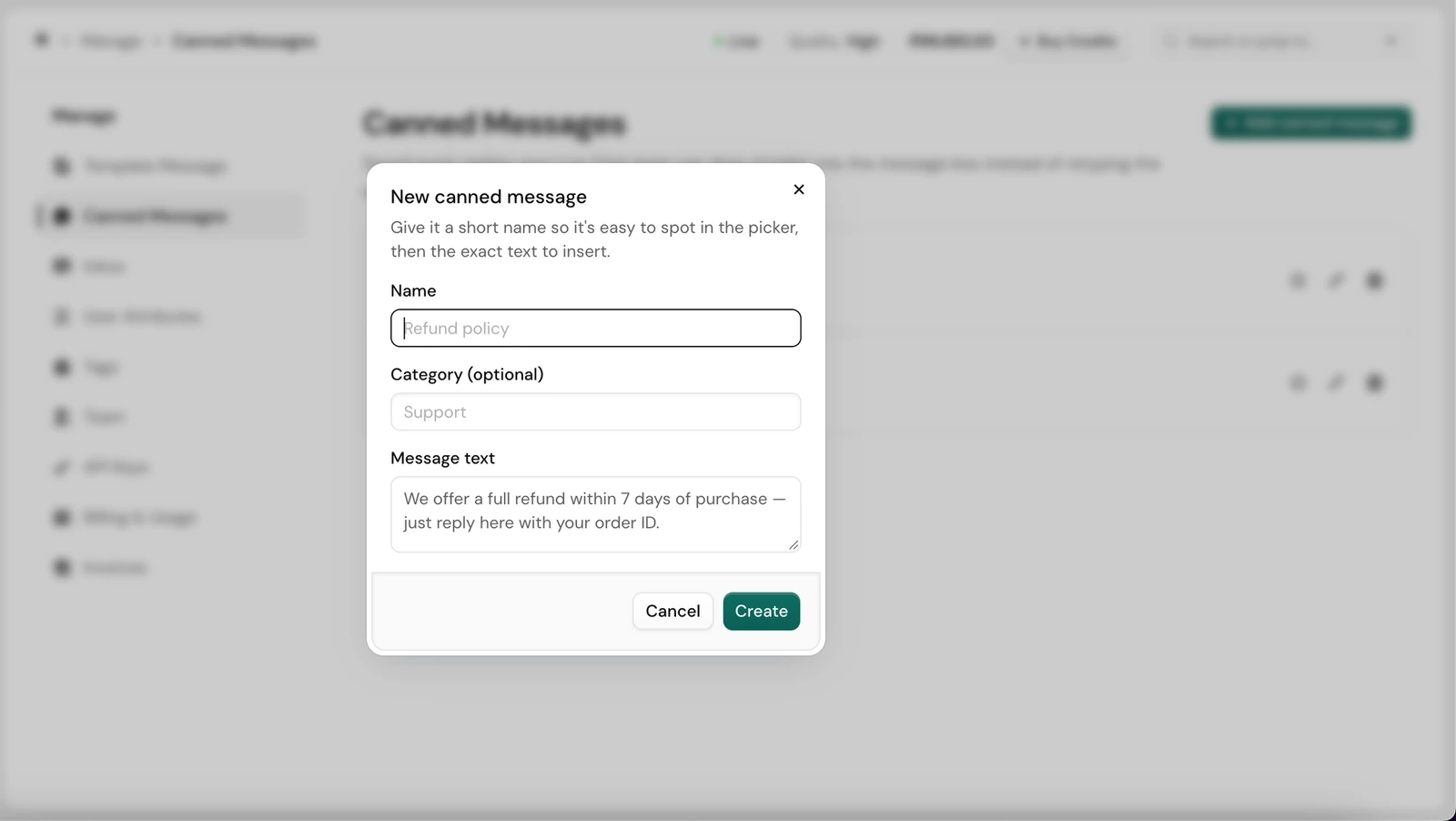
Canned replies
- Pain point:
- After every campaign, replies cluster into the same few questions, and agents typed each answer fresh.
- Solution:
- Saved replies the team drops into a chat in one click.
H
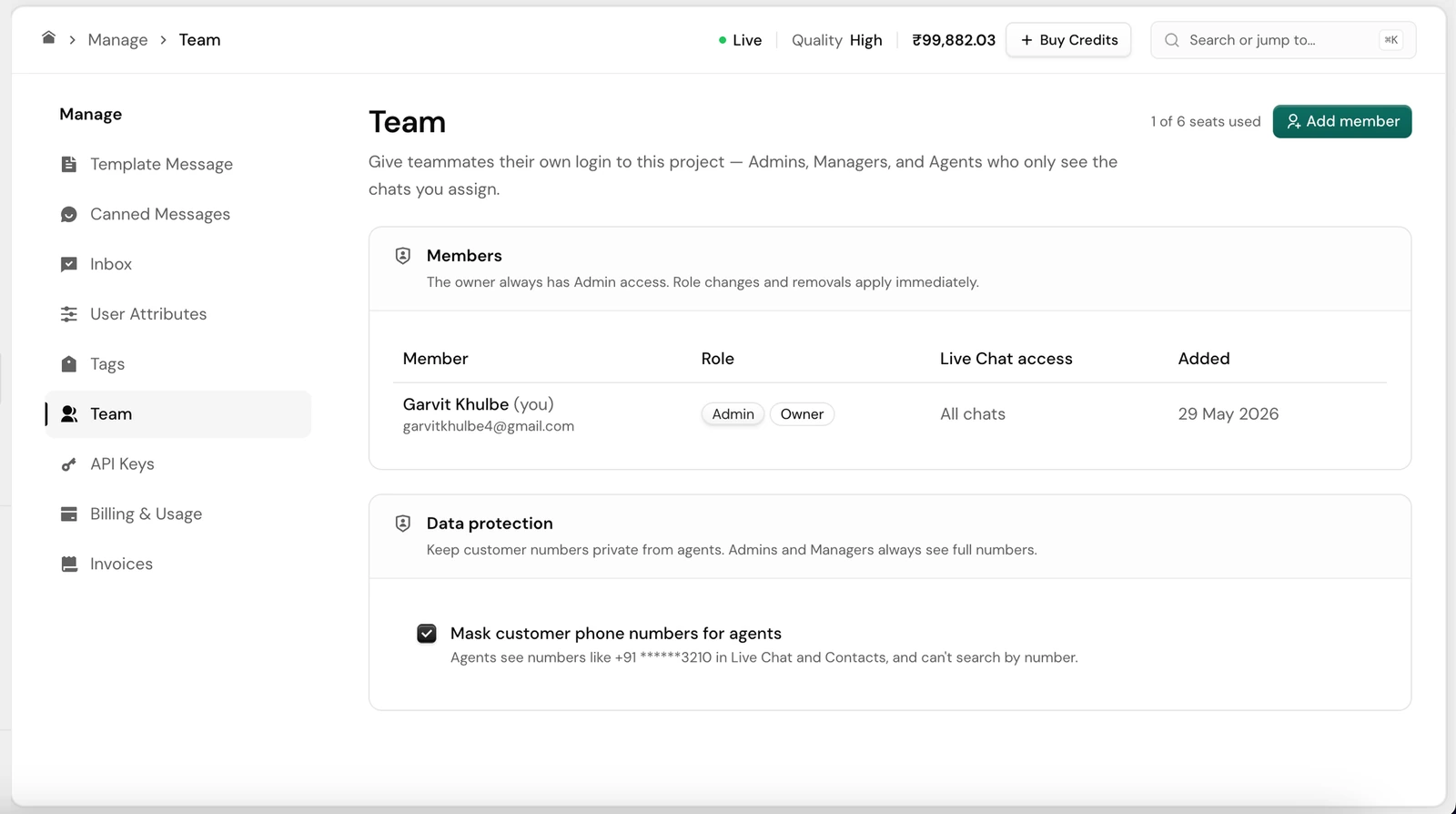
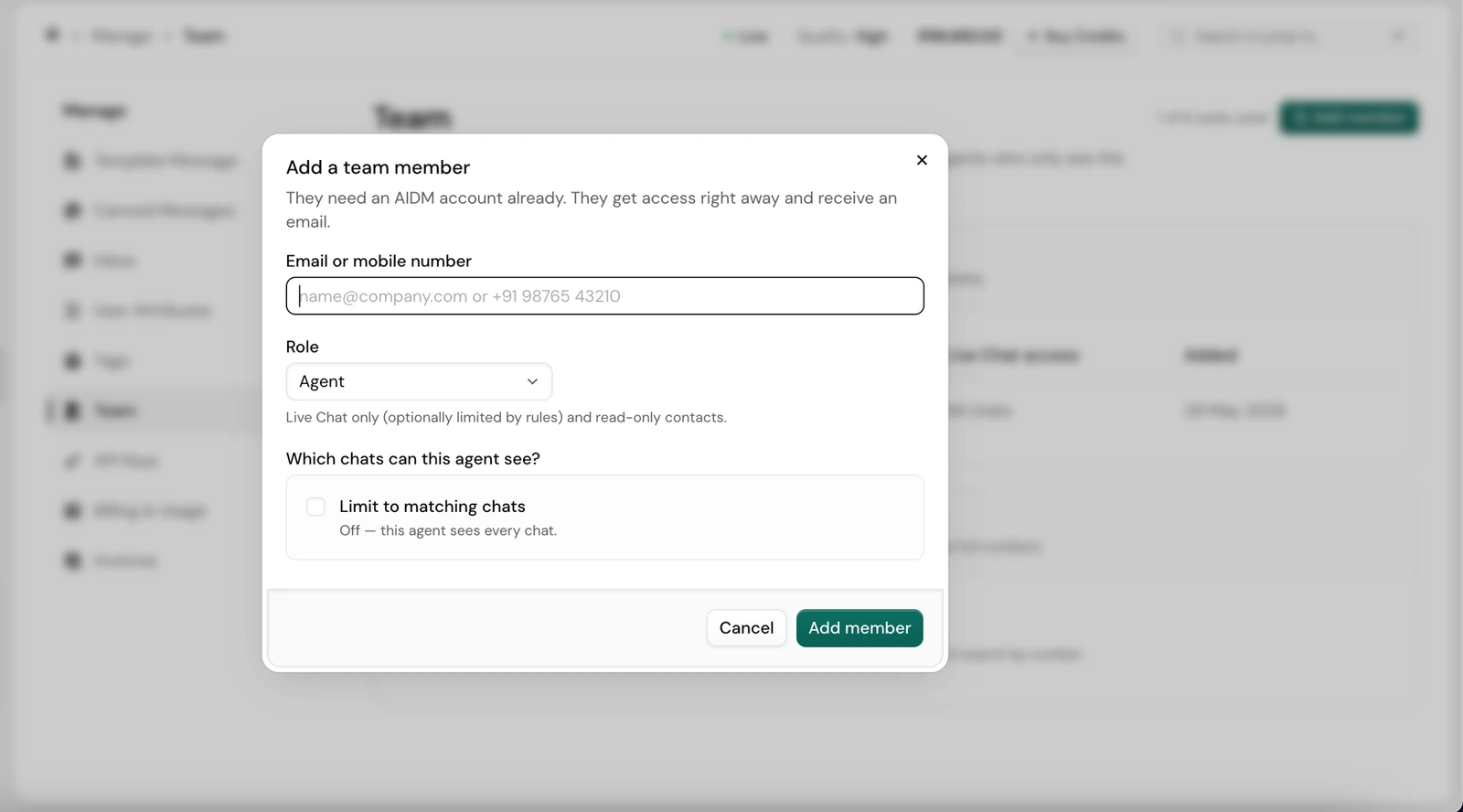
Team logins, roles and number masking
- Pain point:
- Everyone shared one login, so nobody knew who replied to whom, and every agent could see every customer’s number.
- Solution:
- Separate logins with Admin, Manager and Agent roles. Agents only see the chats assigned to them, and customer phone numbers can be masked from agents.
04Metrics & guardrails
Measured on delivery, not volume
Volume is easy to inflate and is shared with marketing and sales. So I judged the product on whether messages actually reached people, and checked that quality held as volume grew. All figures come from the production database.
North Star: messages delivered to customers
That’s the value a business pays for. Delivery rate went from 49% to 77%, and reached 218,000+ delivered messages and 133,000+ people.
Delivery rate
0%
At launch
before any change
0%
After fixes
Layer 1
0%
After features
Layer 2, at 3× the volume
Secondary metrics
- Activation: 64% connect WhatsApp the day they sign up
- Engagement: 19K+ customer replies to businesses
- Retention: 44 campaigns re-run by returning businesses
Guardrails
- 0 WhatsApp numbers disabled by Meta
- 77% delivery held at 3× the volume
- 3 in 4 delivered messages read, steady throughout
Per day, before vs after the new features
Volume growth is shared with marketing and sales. Delivery, activation and zero bans are the product’s share.
05Risks, trade-offs & future scope
What I watched, what I gave up, what’s next
Risks & mitigations
- Meta bans for messaging unconfirmed contacts: opt-in status explained in place. 0 numbers banned.
- Agents misusing customer data: role-based access and phone number masking.
- Meta quietly reclassifying a template mid-campaign: auto-pause specced for the next phase.
Trade-offs
- Ads manager and in-chat payments: pushed out. Each was a multi-quarter build, and neither helps a business that can’t yet see its own results.
- Template builder: kept, not rebuilt. Fixing the copy gave most of the value for a fraction of the engineering effort.
- Using the product instead of analytics. Slower to prove, but it found a ban risk no metric would have flagged.
Next phases
- Phase 2: readable variables (“Insert: Customer Name” instead of {{1}}), festival templates for Diwali and Holi, auto-pause on reclassification, and auto-resolving old chats.
- Phase 3: click-to-WhatsApp ads and in-chat payments, once businesses are running steady campaigns.
What I took away
Marketing brings people in. The product decides whether they stay.
You don’t need a dashboard to find what’s hurting users. Fixing the foundation before adding features is why aidm.me could grow 35× without breaking.